How to collect every photo your wedding guests took

Your photographer covers the day from one position at a time. Your guests cover it from a hundred. Their photos exist the moment the night ends, on phones you will not see again for months. This guide is the whole job of getting them: what to set up, when, where the code goes, what guests see, how to keep the album private, and what to do in the week after.
- What is the easiest way to collect photos from wedding guests?
- Make one shared album that gives you a link and a QR code, print the code on the tables, have someone mention it once, and send the link again the next morning. Guests should be able to add from their phone browser with no app and no account.
- Do guests need to download an app?
- Not with Kepla Albums. Scanning the code or tapping the link opens a page in the phone browser. Guests pick photos, optionally type a name, and send. There is no install, no account and no email address to give.
- When should we set the album up?
- A week or two before the wedding. That leaves time to print the card, test the code with two phones and tell whoever is running the evening. Set it to take photos for 30 days so it is still open in the week after.
The whole method in six lines
If you read nothing else, this is the plan that works:
- Make one shared album a week or two before the wedding. One, not one per table or per side of the family.
- Get its link and its QR code. The link is for messages, the code is for paper.
- Print the code where people sit and wait: tables, the bar, the guest book. Not only at the entrance.
- Have someone say it out loud once, ideally the MC or whoever gives the first toast.
- Send the link again the morning after, while the photos are still the last thing on every phone.
- Keep the album open for at least a week after the day. Plenty of guests only get to it once they are home.
The rest of this guide is the detail behind each line, using Kepla Albums as the worked example because it is free and guests need nothing installed. The same plan works with any tool that gives you one link and lets people add without an account.
Why "just send me your photos" does not work
Every couple asks, and a handful of photos is the usual result. It is not that guests do not care. Each common route has a specific failure:
| Route | What goes wrong |
|---|---|
| Group chat | Photos are shrunk on the way in, and a good one is buried under forty replies by morning. WhatsApp's standard setting takes an iPhone photo down to 960 by 1280 pixels unless the sender switches to HD, according to 9to5Mac's report on WhatsApp photo quality. |
| A hashtag | Only guests with public accounts who remember the tag. You get what people chose to post, not what they shot. |
| Shared phone album | Works well inside one family of phones. A mixed crowd means accounts, invitations and someone's aunt locked out. |
| "Email them to me" | Attachment limits stop it at a few photos, and nobody sends a second email. |
| An app everyone downloads | Each extra step loses people. An install, then an account, then a code is three chances to put the phone back in a pocket. |
What these have in common is that the guest has to do work for you at a party. The method that works asks for one action they already know: point the camera at a code, or tap a link.
Step 1: make the album
Open getkepla.com/albums and sign in with your email. There is no password: you get a link by email and clicking it signs you in. Press New album.
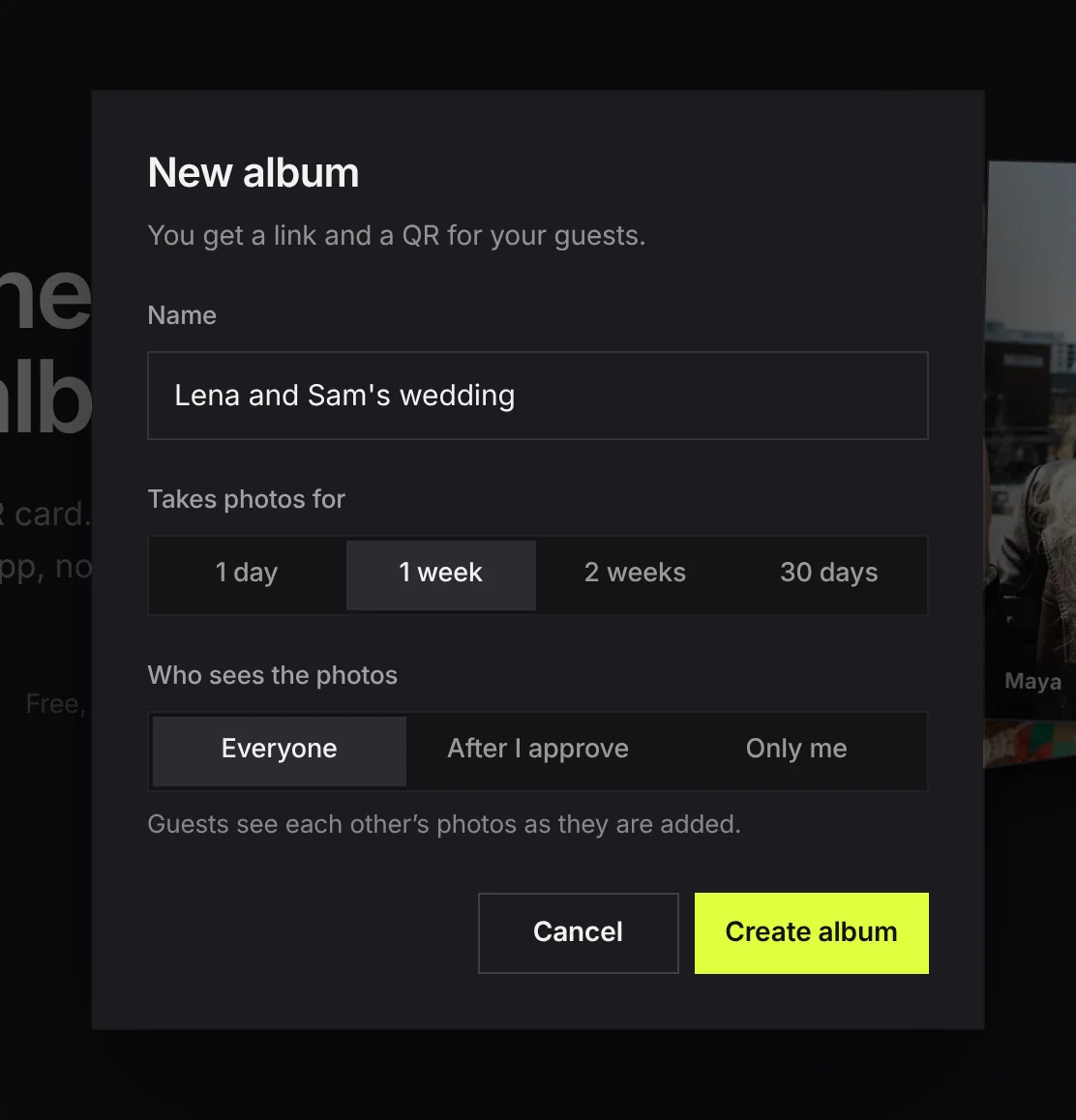
Three things to set:
- Name. Use the name guests would recognise on a sign, such as "Lena and Sam's wedding". It is printed on the card and shown at the top of the page they land on.
- Takes photos for. One day, one week, two weeks or 30 days. For a wedding pick 30 days if you are making it before the day, so it is still open in the week after. You can move the date later.
- Who sees the photos. One choice with three answers. Everyone: guests see each other's photos as they are added. After I approve: new photos wait for you first. Only me: guests can add, and only you see what comes in. More on choosing below.
Press Create album. The page that opens has the QR code and the link on it, ready to use.
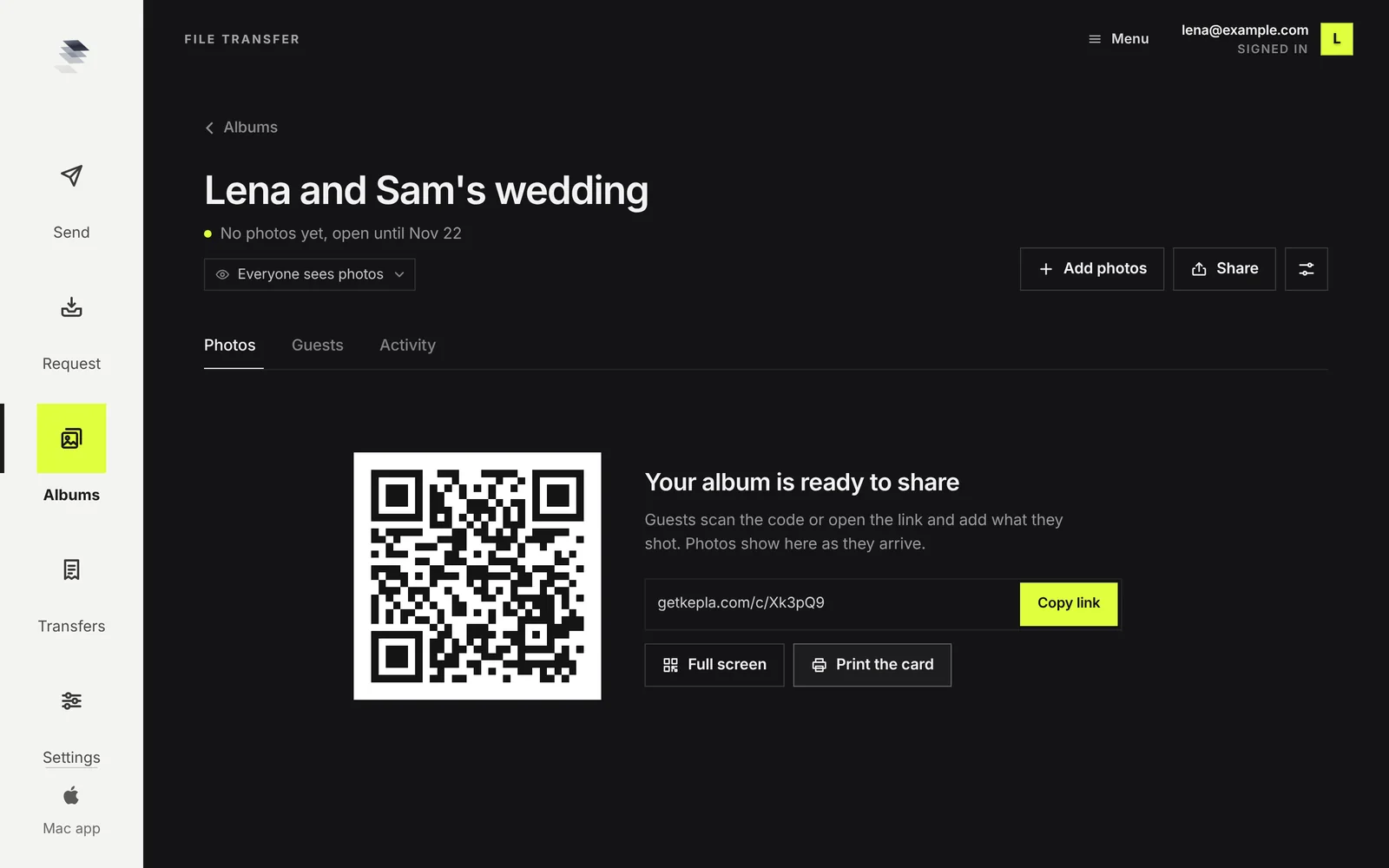
Step 2: put the code where people wait
The code only works if people see it at a moment when they have a free hand and nothing to do. Entrances are the worst place: everyone is carrying something and looking for someone.
Places that work, starting with the one that matters most:
- On each table, standing up, at eye level when seated. This is where guests spend the longest stretch with their phone out.
- At the bar, where there is a queue.
- Next to the guest book or the gift table. People are already doing a small task there.
- On the back of the menu or the order of service, so it goes home in a pocket.
- On your wedding website and in the thank you message, as a link, for everyone who meant to and forgot.
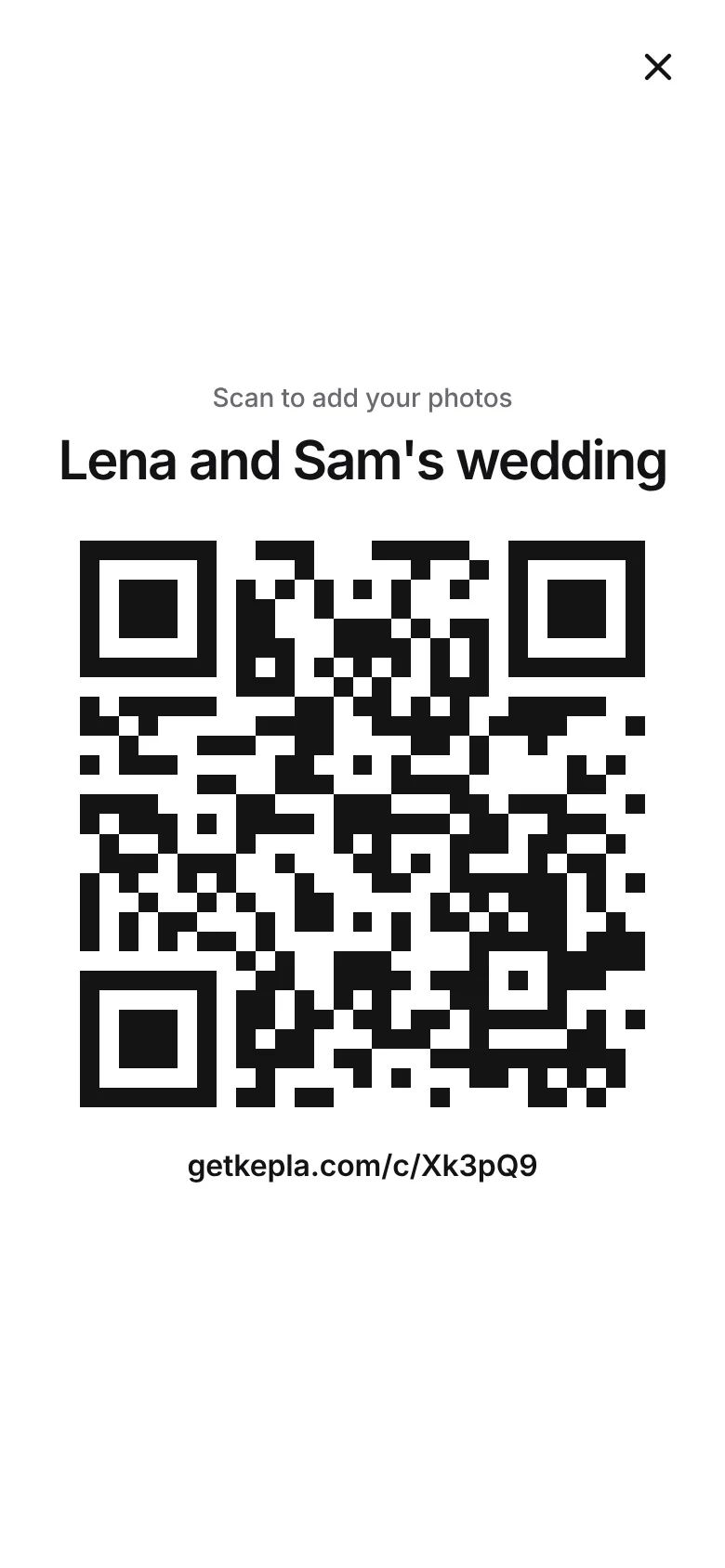
Press Print the card on the album page. You get a clean page with the album name, one line of instruction, the code and the short link under it for anyone whose camera will not scan. Print it, or save it as a PDF from the print dialog and send that to whoever is doing your stationery.
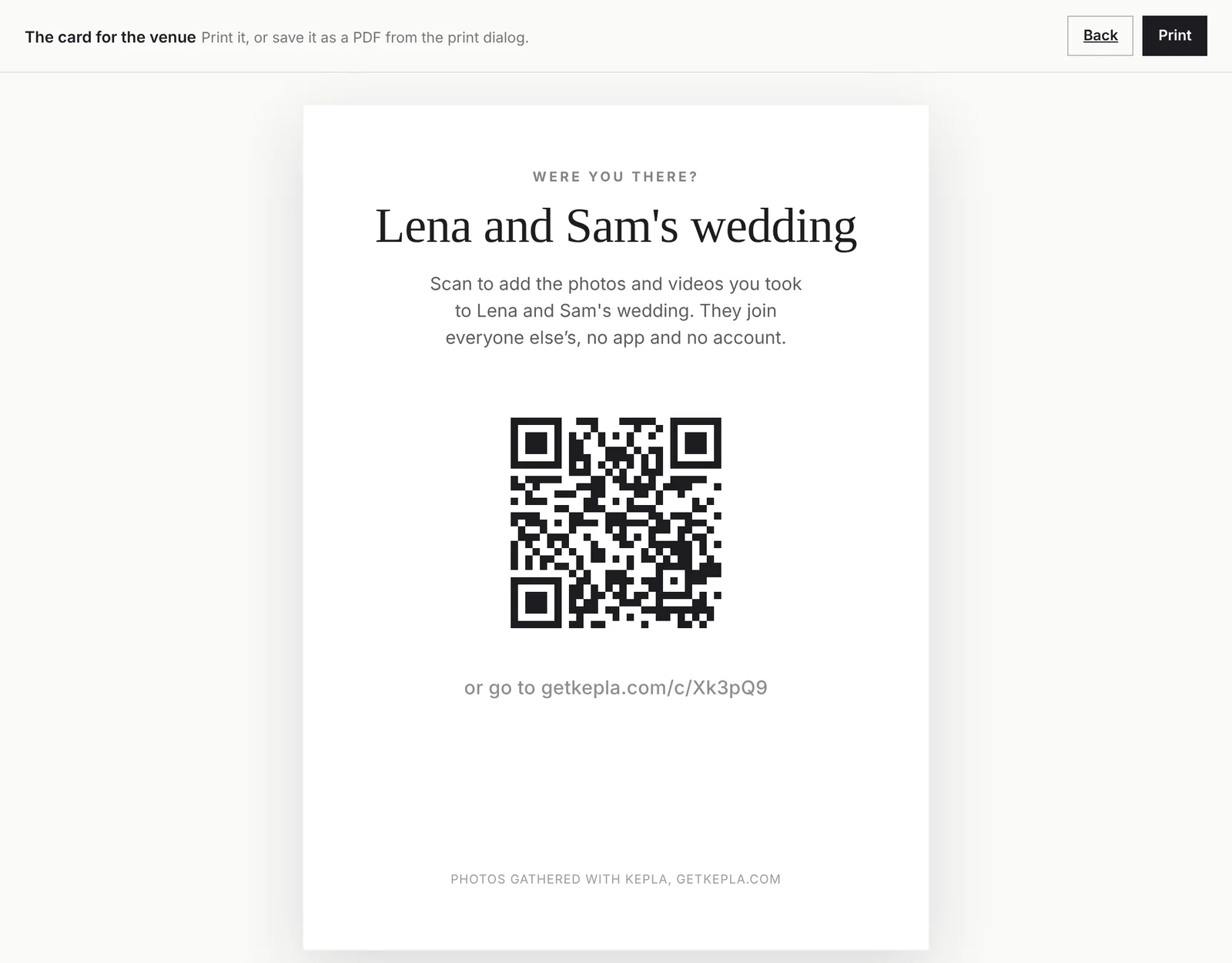
Print it larger than you think. A code about 3 cm across is fine at arm's length on a table. A sign people read from across a room needs a code several times that size. Test every print with two different phones before the day. For more on sizes, materials and wording, see the QR code guide and wording for the sign.
Step 3: what your guests see
Scan the code yourself before you print anything, so you know exactly what you are asking people to do. A guest sees one page with the name of your album and two buttons.
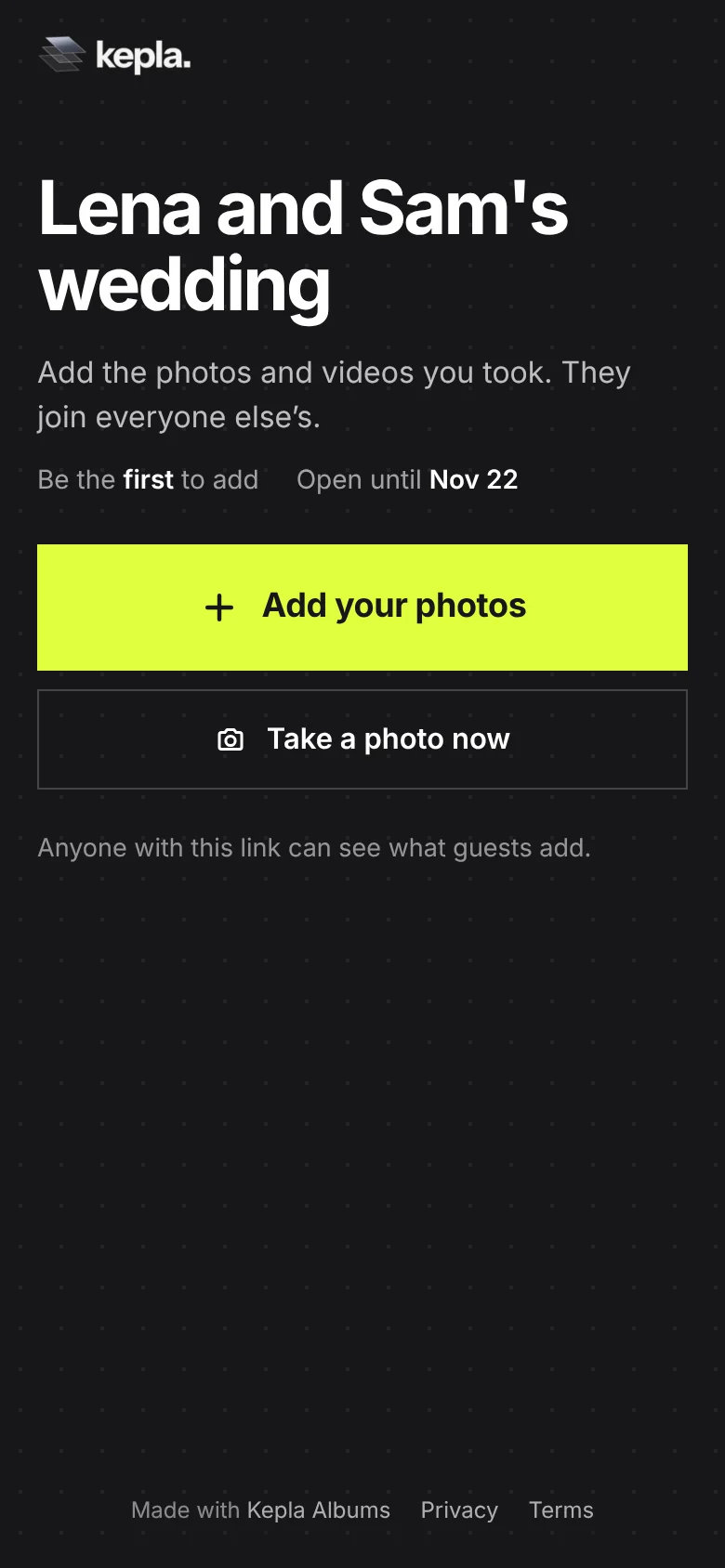
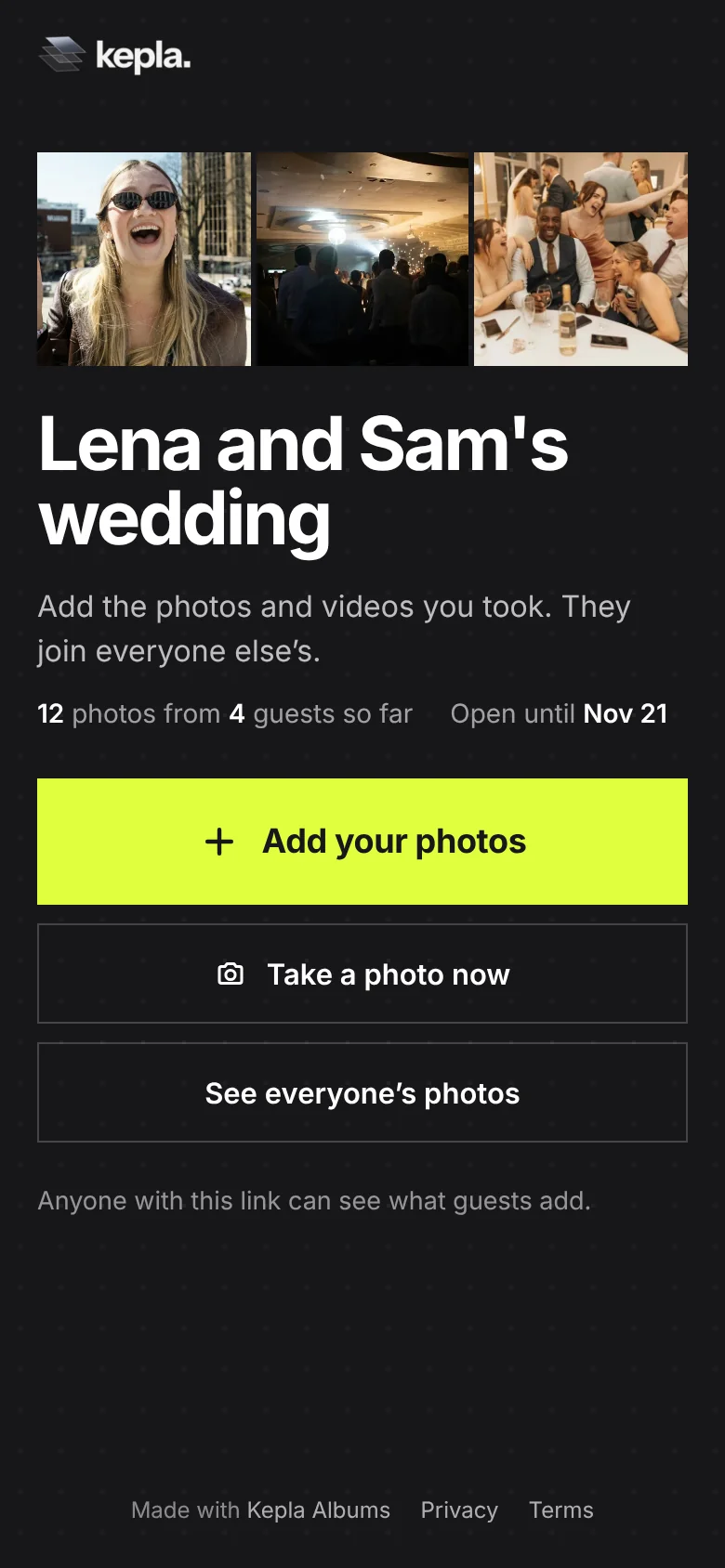
- Add your photos opens their camera roll. They pick as many as they like, type their name if they want it shown, and send.
- Take a photo now opens the camera for a single shot that goes straight in.
- See everyone's photos appears once the album has photos, unless you have set the album so only you see them.
They do not install anything, make an account or give an email address. One add takes up to 300 photos or videos and up to 500 MB. A guest with more than that adds the rest in a second go. Kepla does not shrink or recompress what they send.
Step 4: decide who sees what
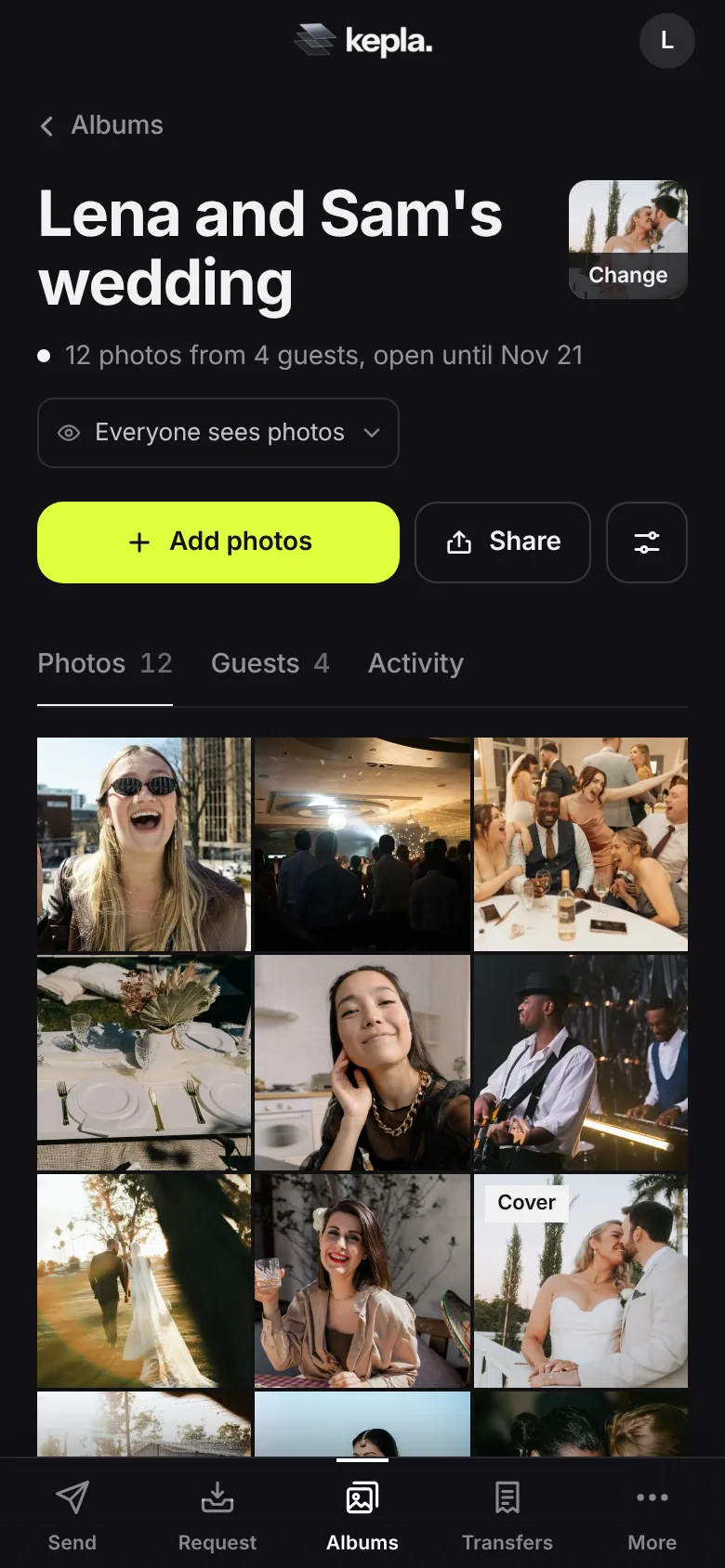
There are two questions, who can add and who can look, and the album page answers both under the title so you never have to remember what you chose.
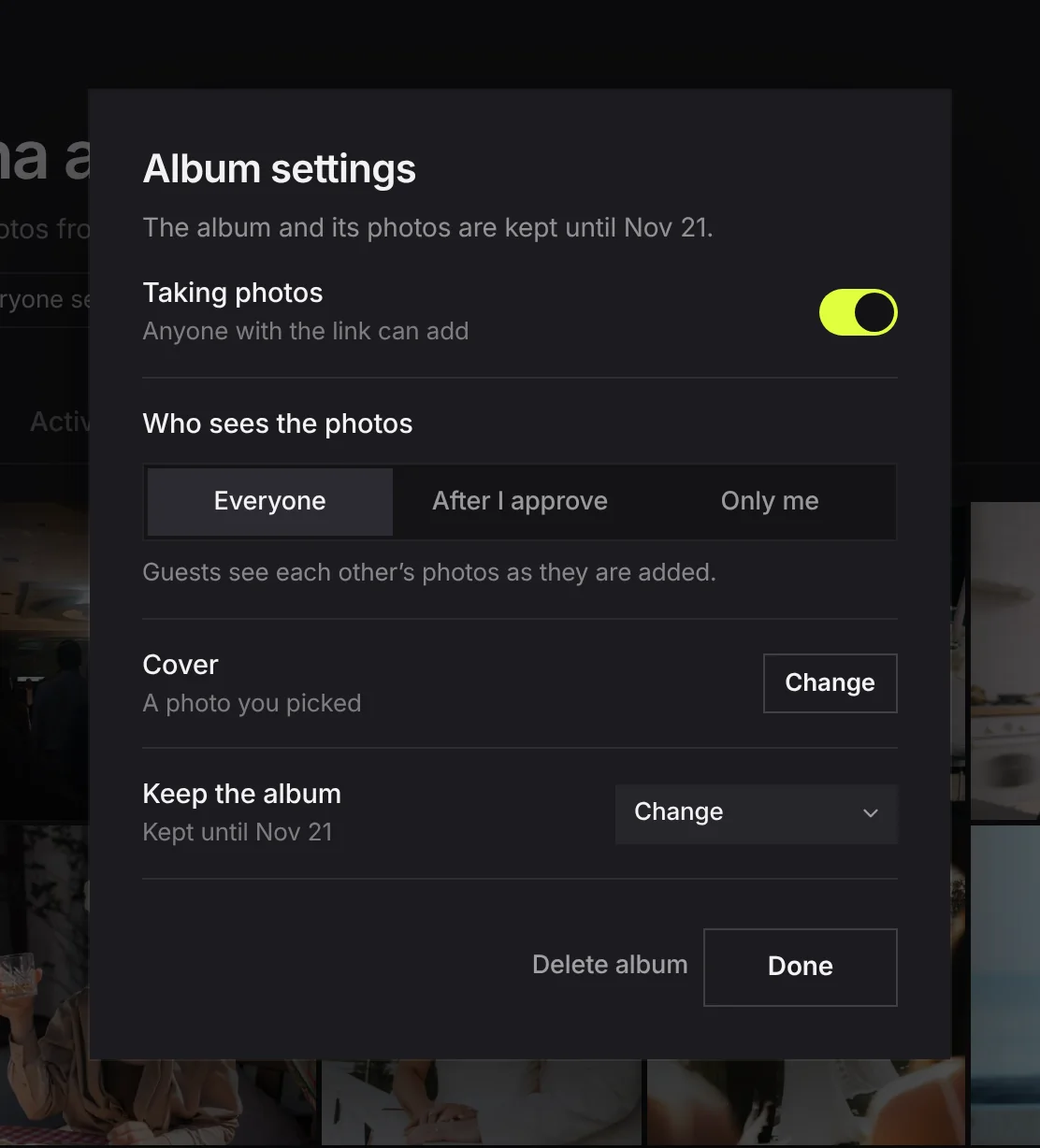
| Question | Setting | Pick this when |
|---|---|---|
| Who can add? | Taking photos: on or off | Leave on until a week or two after. Turn off to freeze the album. |
| Who can look? | Who sees the photos: Everyone | Right for most weddings. Seeing photos arrive gives other guests a reason to add theirs. |
| Who sees the photos: After I approve | The link will be on a public sign or a website, or you would rather look first. | |
| Who sees the photos: Only me | You want to be the only one who sees the raw collection. |
Only people who have the link or the code can open the album at all. It is not listed anywhere and it is not on a public feed. If one photo should not be in front of everyone, hover it and press Hide: it stays in your view and disappears for guests. If a whole upload should go, remove it from the Guests tab. A longer look at these choices is in should you approve guest photos first.
Step 5: the day itself
You will not be managing an album at your own wedding, so hand it to someone. A sibling, a planner or the MC needs to do three things:
- Check the cards are on the tables before guests sit.
- Say it once, out loud. One sentence is enough: "There is a code on your table. Scan it and add the photos you take tonight, we would love to have them." A sign is easy to miss. A person asking is not.
- Show the code on a screen if there is one. Press Full screen on the album page and the code fills the display and keeps the screen awake. It works on a phone held up at a table as well as on a projector.
Step 6: the week after
The day itself is the worst time to ask anyone for anything. The week after is when guests have time, and it is where couples tend to stop too early.
- The next morning, send the link to the family chats and the wedding party with one line. Photos from the night are still at the top of every camera roll.
- Three or four days later, send it once more with a reason: "We are closing the album on Sunday, last call."
- Look at the Guests tab. It lists who added and how many. If the people you know took the most photos are missing, message them directly. A personal ask gets an answer.
- Tidy. Hide the few that should not be there. Pick a cover.
- Save what you want to keep. Open any photo and download it at full size.
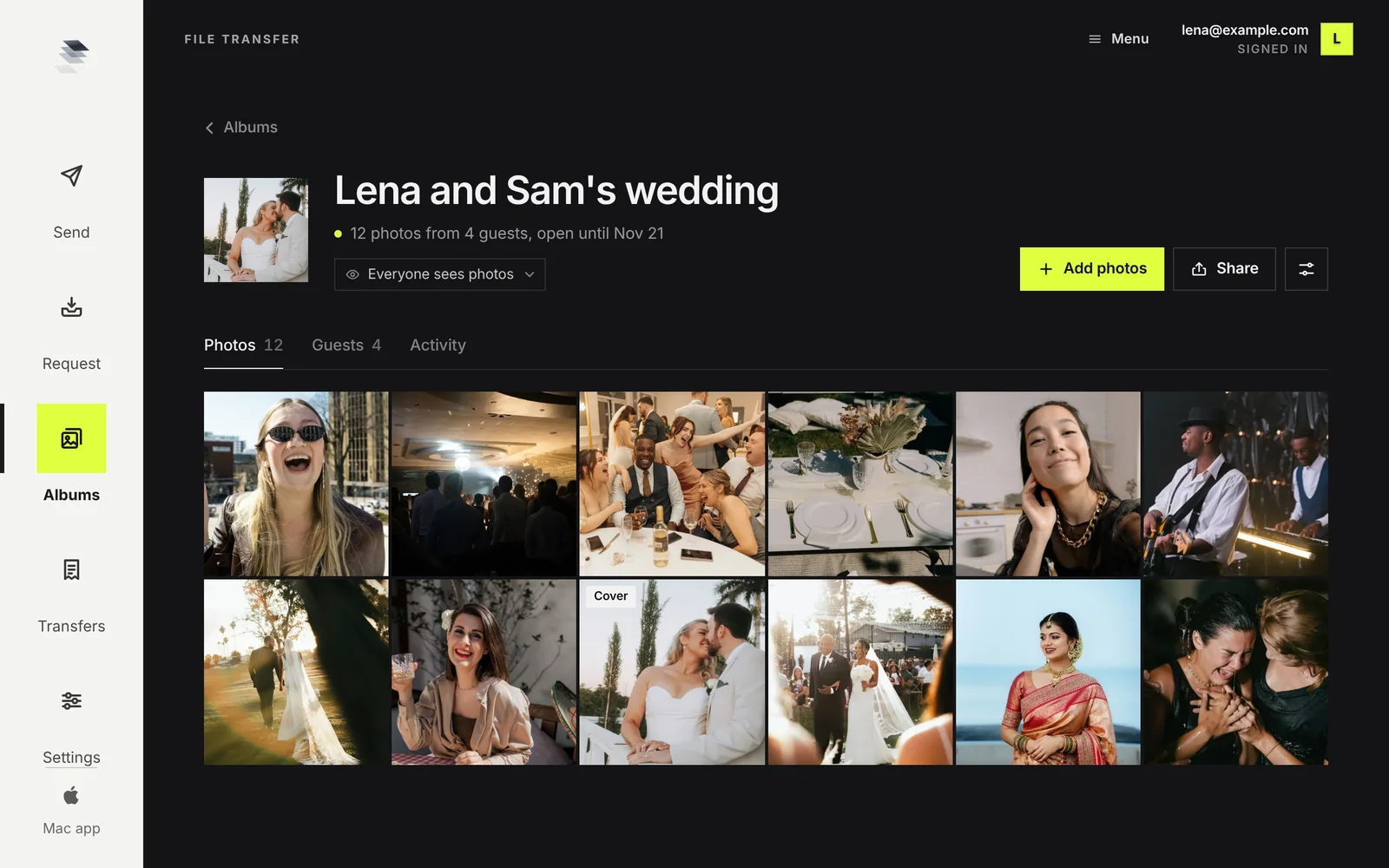
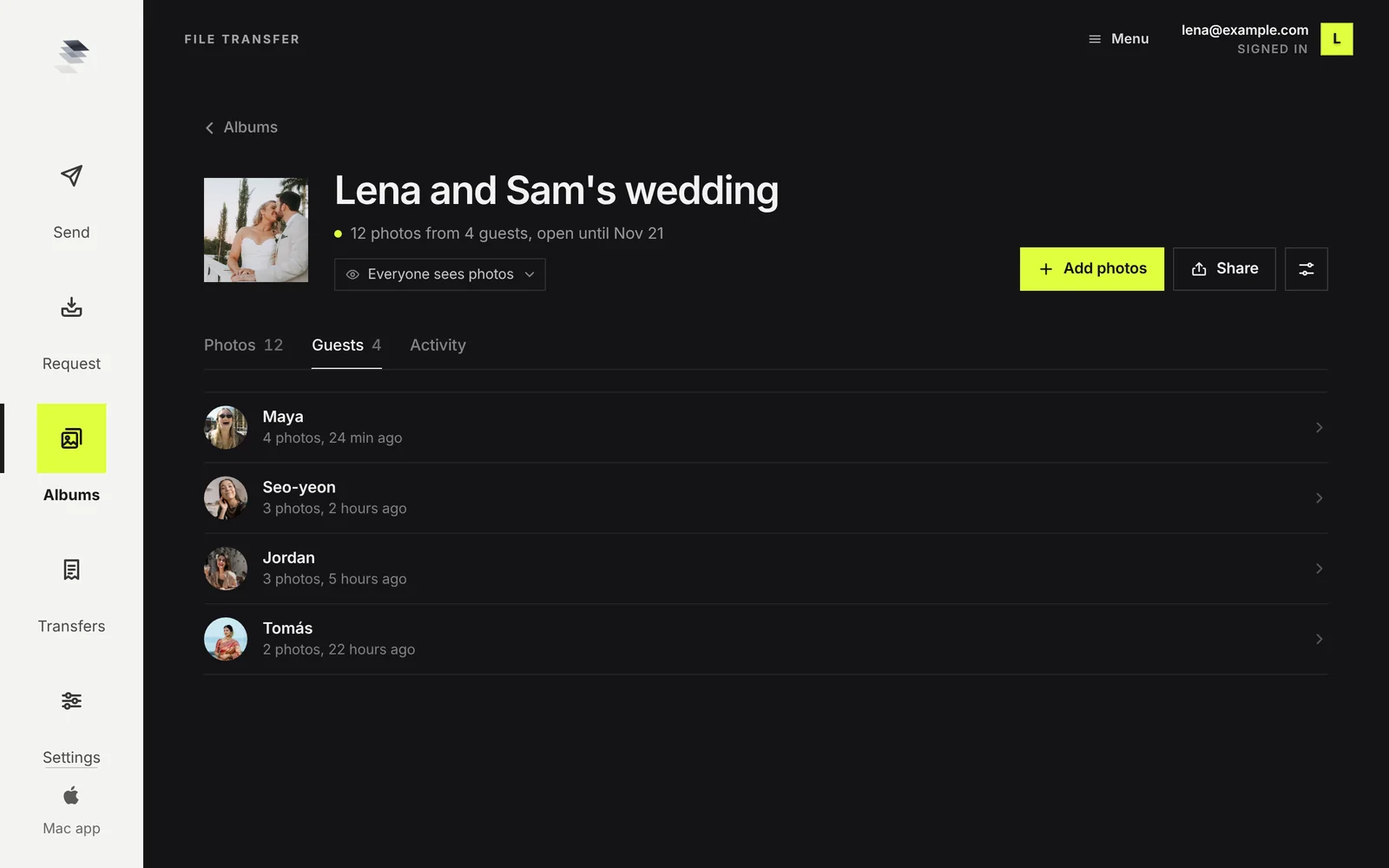
Two things to know before you plan around it. An album is kept until the date shown in its settings, and you can move that date up to 30 days ahead at a time, so set a reminder if you want it longer. And photos are saved one at a time for now: there is no single button that downloads the whole album.
Seven mistakes that cost you photos
- Making it on the morning of the wedding. Nothing gets printed and nobody is told.
- Only one sign, at the door. The code needs to be where people sit.
- A code that is too small or printed on gloss under spotlights. Glare stops a camera reading it. Matt paper, decent size.
- Not testing the print. Scan the real printed card with two phones.
- No spoken ask. Signs are easy to ignore. One sentence from the MC is not.
- Closing the album the next day. Leave it open a week or more.
- Asking for an app. If the first screen says "download", many guests stop there.
FAQ
What is the easiest way to collect photos from wedding guests?
Make one shared album that gives you a link and a QR code, print the code on the tables, have someone mention it once, and send the link again the next morning. Guests should be able to add from their phone browser with no app and no account.
Do guests need to download an app?
Not with Kepla Albums. Scanning the code or tapping the link opens a page in the phone browser. Guests pick photos, optionally type a name, and send. There is no install, no account and no email address to give.
When should we set the album up?
A week or two before the wedding. That leaves time to print the card, test the code with two phones and tell whoever is running the evening. Set it to take photos for 30 days so it is still open in the week after.
Can other guests see the photos?
That is your choice. Who sees the photos has three answers: Everyone, where anyone with the link can browse the album; After I approve, where new photos wait for you first; and Only me, where guests can still add but only you see the photos. You can change it at any time.
Is it free, and are the photos shrunk?
Kepla Albums is free. Kepla does not shrink or recompress what guests add. One add takes up to 300 photos or videos and up to 500 MB, and a guest can add more in a second go.
How long are the photos kept?
Until the date shown in the album settings. When you make the album you choose one day to 30 days, and you can move the date up to 30 days ahead at a time. After that date the album and its photos are deleted, so save the ones you want before then.
Can I remove a photo someone added?
Yes. Hide a single photo and it disappears for guests while staying in your view. Remove a guest's whole upload from the Guests tab and it is gone for everyone. You can also turn on approval so nothing shows to other guests until you have looked.
Everyone's photos, in one album.
One link or QR code. Guests add from any phone with no app and no account, and you decide who sees what.
It stays in your saved guides on this browser. Want it in your inbox too? One email with the link now, and the next guide when it is out. No pitches, unsubscribe with a reply.